Getting started with digital music recording: Part 1
The past couple of months I have been reading about audio recording. I have always thought it would be fun to start composing and arranging music on the computer. I have slowly armed myself with a knowledge base and equipment to get going. This post is going to explain my experience so far getting into music recording and some pitfalls that I have gone through. I am splitting it up into two posts so it doesn’t get too long.
Beginnings
The first thing that you need is some type of instrument that could talk to the computer. I play the piano, so I thought getting a synthesizer would be the best fit for me. After reading more about them, that is actually a great instrument to use for recording. Here are the reasons:
- pluggable in to a computer via USB
- have a bunch of instruments for variety
- easy for computers to translate into digital format
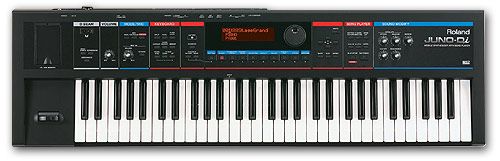
So I bought a Roland Juno Di Synthesizer and started reading about all of the different buttons and knobs to know what it can do. It only takes a few hours hours of playing around and reading the manual to understand how it works.
It came with a USB output, so I plugged it into the computer and installed the drivers from the CD. It didn’t really explain what the drivers were for, so I just installed them thinking I was going to hear something come out of my computer speakers.
Wrong.
Nothing happened.
Audio Interfaces and Software
After reading from the manual, I found out that the USB input for the computer is the same thing as a MIDI input in terms of what gets transferred. All that gets transferred to the computer is information like what key was pressed and how I hard I pressed it. None of the instruments in the keyboard transferred to the computer. Just arbitrary numbers that have the potential to be mapped up later. Dang. More research.
To get the instruments on the keyboard to work right, I needed two things
- Audio Interface
- Audio Software
Audio interfaces are boxes that you plug instruments into and it can convert an analog signal to a digital signal. That translates to making my keyboard sounds be heard by the computer. Not only can it take my keyboard’s sound, but it can take an electric guitar, microphone, or a number of different input devices.
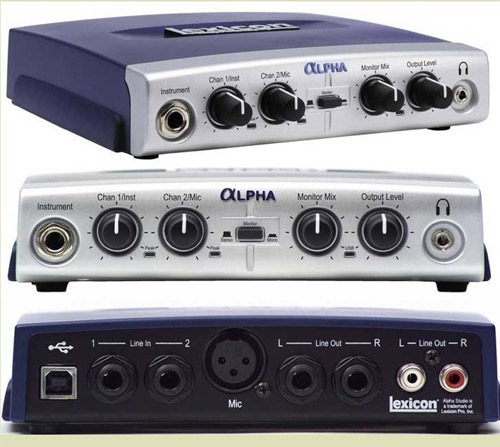
For the audio interface to work, it needs an audio program on your computer to process the information. No other programs seem to work that come bundled with Windows.
Some of the options for audio software are Audition, Sonar, Cubase, ProTools, and Garageband. Just do a search on audio recording software and a bunch of options will show up.
The first thing you will notice is that software is expensive. For just wanting to learn and figure things out, I was starting to go down the torrent path to see which one I liked best. Someone else must also see this as an issue for hobbyists, because many of the audio interfaces come with recording software. Not the full-blown version, but a pretty good version to learn some of the bells and whistles. Good enough for me!
I got the Lexicon Alpha. It is great because it has a few different hookups for instruments and also comes with a version of Cubase LE. The combo came in at a crazy $60, so I was a bit skeptical of the price and quality. Some audio interfaces are very expensive, but they seem to do a lot of the same things that you can do with the audio software. All it needs to really do is get the sound to a computer. Reviewers on sites said it worked good. Sold.
Hooking up!
With an audio interface, there are a few ways to hook up your instrument. The simplest way is to use a 1/4" cable and go from the mono out of your keyboard to the audio interface mono in. I have two 1/4" cables and use the stereo out to plug it in. My keyboard sounds seem like they were made for stereo out, because it sounds better. Either work though. I bought a nice set of monitor headphones (I bought mine for $40 from Tony off Craigslist). Monitor headphones are just nice headphones that reproduce the sound more accurately than ear buds or cheap headphones.
The audio interface is really a sound card, so when you plug it in, it will override everything and take control of all of the sound. You will have to put your headphone jack into the audio interface to hear anything.
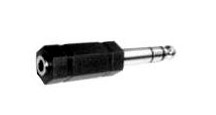
A lot of hook ups seem to need converters from 1/8" to 1/4" or vice versa.
Read the manual about what the knobs do. The strangest one is the monitor mix, which changes the volume balance of what comes from your instrument and what comes from the computer.
Once I got all of the drivers for the keyboard, audio interface, and audio software installed, ready to start recording.
Whew…that was a lot more work than I thought.
And Wait…there’s more!
Part 2 will continue on the quest of getting the audio interface to work and getting more familiar with the software. It is mostly written, but I feel lazy and probably won’t get it posted until later in the week. Gotta add some pictures.
Page Contents

I mostly keep this blog to help me remember things. Writing is also a great way to understand things at a deeper level. I would highly recommend it if you don't write at all.